YouTube Morphe Apk
21.02.35
Developer
Google LLC
Google LLC
Updated
Jan 6, 2026
Jan 6, 2026
Size
90 MB
90 MB
Version
21.02.35
21.02.35
Requirements
Requires Android 9.0 and up
Requires Android 9.0 and up
Downloads
100,000,000+
100,000,000+
Get it on

Report this app
Description
YouTube Morphe APK
is an advanced, community-driven YouTube mod that replaces ads with full user control, adds powerful playback tools, and unlocks many features normally locked behind YouTube Premium.
It targets Android power users who want an ad-free, highly customizable, and privacy-aware YouTube experience without rooting their devices.
What is YouTube Morphe?
YouTube Morphe is an open‑source modified client of the official YouTube app, created by the original contributors behind ReVanced Extended.
It runs alongside the stock YouTube app with its own icon, name, and settings, so users can keep both versions installed on the same device.
Unlike typical “modded” clones, Morphe is built around a patching philosophy: the app applies more than 70 targeted patches to the official YouTube APK to unlock features, disable limitations, and give granular control over playback, interface, and privacy.
The goal is to offer a premium-level, distraction‑free viewing experience without subscription requirements or root access.
Key Features and Experience
YouTube Morphe focuses on three pillars: no ads, deep customization, and smarter control over how videos play and look on the screen.
The result is a YouTube that feels tailored to the viewer rather than to advertisers or algorithmic engagement.
Complete ad blocking: Video, banner, and in‑feed promotional content are removed, and pre‑rolls are skipped automatically.
- Combined with SponsorBlock integration, Morphe can also skip sponsored segments, intros, and outros inside the video itself.
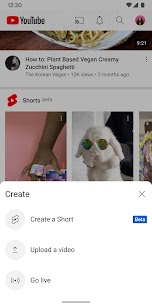
- Background and PiP playback: Videos continue playing when the screen is off or when switching to other apps, and Picture‑in‑Picture works without needing YouTube Premium.
- Return YouTube Dislike: Morphe restores visible dislike counts using the Return YouTube Dislike service, giving a more honest signal of video reception.
- Swipe and gesture controls: Volume and brightness can be adjusted by swiping on the screen, with optional gesture presets for quick seeking and navigation.
- Shorts control: Users can hide Shorts entirely or strip their UI (likes, comments, share buttons, and more), or even open Shorts in the normal video player.
Customization and Power-User
ToolsMorphe’s customization depth is what turns it from a simple ad block into a toolbox for heavy YouTube users.
Nearly every visual and behavioral aspect of the app can be tuned to match personal preferences, from the home feed to playback defaults.Interface theming: Pure black AMOLED theme, custom accent colors, and multiple layout options help reduce eye strain and save battery on OLED screens.
App identity tweaks: Users can change the app icon, app name, header logo, layout density, and start page to make Morphe feel like a bespoke YouTube client.
Playback defaults: It is possible to force default quality (up to 4K with device spoofing), set preferred playback speed, disable autoplay, or enable loop by default.
Feed and UI cleanup: Morphe can hide elements like Shorts rails, community posts, end cards, info cards, buttons, and other overlays to create a cleaner, distraction‑free feed.
Alternate thumbnails: With DeArrow‑style alternative thumbnails, the app can replace clickbait covers with frames taken directly from the video timeline.
For users who download content, Morphe integrates with external downloaders to save videos locally in different resolutions and formats.
It also supports audio‑only playback to conserve bandwidth and battery for music or podcasts.
Technical Basics and Installation
YouTube Morphe targets Android devices and is distributed as an APK, typically alongside a companion MicroG or GmsCore package to handle Google account login without relying on original Google Play Services.
Once configured, the modded client behaves like YouTube but with all Morphe patches active.Typical installation flow:Download the appropriate YouTube Morphe APK build for the device’s architecture and YouTube version.
Install or update MicroG/GmsCore, then sign in with a Google account through MicroG if login is desired.
Install the Morphe‑patched YouTube APK and launch it; the app appears as a separate client with its own icon and can coexist with the stock YouTube.
APK sizes vary by build and version, with some distributions listing packages around 70–170 MB depending on included components.
The app is designed to run well on a wide range of Android devices, including mid‑range hardware.
Legal, Safety, and Ethical NotesLike other YouTube mods, YouTube Morphe operates outside Google Play’s official ecosystem and technically violates YouTube’s Terms of Service, particularly regarding ad‑blocking and modified clients.
Using such apps may carry risks such as account limitations or incompatibility with future YouTube changes, so users typically proceed with secondary accounts or caution.
Since YouTube Morphe is open source and built by a visible community, users can review source code and builds shared by trusted maintainers, which improves transparency compared with obscure “mod” clones.
However, downloading APKs from unofficial mirrors always demands careful scrutiny of the source, checksums, and community feedback to reduce the risk of tampered or malicious packages.
How to safely install YouTube Morphe APK step by step
Safest practice is to use the official Morphe resources, install MicroG once, then install or patch YouTube Morphe from a trusted build and keep Play Protect warnings in mind.
The steps below are general guidance only, not a recommendation to bypass YouTube’s Terms of Service.
Before you startUnderstand the risk: YouTube Morphe is a modded client and is not on Google Play, so it can conflict with YouTube’s rules and trigger Play Protect or login issues.
Using a secondary Google account is safer than risking your main account.
Enable APK installs: On Android 9+, go to Settings → Apps & notifications → Special app access → Install unknown apps, and allow your browser or file manager to install APKs.
Step 1 – Get resources from official MorpheVisit the official Morphe site, which centralizes YouTube Morphe, YouTube Music Morphe, MicroG and documentation.
This reduces the risk of tampered APKs from random mirrors.Open the Guides/Documentation section if you want device‑specific or troubleshooting instructions.
Keep this page handy in case you hit errors later.
Step 2 – Install MicroG onceDownload the MicroG package provided specifically for Morphe, which is designed to work across all Morphe apps as a one‑time install. You do not need to reinstall it every time you update YouTube Morphe.
Install the MicroG APK and then open its settings at least once to confirm it is recognized by the system.
If Play Protect blocks installation, temporarily disable Play Protect from the Play Store settings, install MicroG, then re‑enable it.
Step 3 – Choose how to get YouTube MorphePre‑built APK: Trusted sites list pre‑patched Morphe YouTube builds such as version 20.40.45 with full feature sets and MicroG support.
This is the simplest for non‑technical users because you install one APK instead of patching yourself.
Patching yourself (advanced): The Morphe ecosystem builds on the ReVanced style patcher model where you download a manager, select YouTube as the base app, apply Morphe patches, then install the patched build.
This approach is considered safer in community guides because you control the base APK and patches.
Step 4 – Install the YouTube Morphe APKUninstall conflicting ReVanced/Manager builds if a guide explicitly tells you to remove older managers first, to avoid patch conflicts.
Keeping only one main patcher and one YouTube mod reduces errors.
Download the correct Morphe YouTube APK (matching your device architecture and the documented version) from a trusted source like the official listings.
Then open it from your downloads or file manager and proceed with installation.
Step 5 – First launch and sign‑inOpen YouTube Morphe (it has its own package name and icon separate from the stock YouTube client).
Check that videos play and that Morphe‑specific features such as ad‑blocking and UI tweaks appear in settings.
For account sync, sign in through MicroG rather than via standard Google Play Services, as official documentation notes MicroG works across all Morphe apps after a single setup.
If sign‑in fails, consult the Morphe or MicroG FAQ for known login fixes.
Step 6 – Basic safety and update habitsOnly update from the same trusted channel you used initially, such as the official Morphe listings, which track recent versions and changelogs.
Avoid random “mod” aggregators that re‑upload edited APKs.
Keep MicroG installed and updated when official Morphe resources say so, but remember it is normally a one‑time install that continues to work when you update YouTube Morphe builds.
If future updates introduce new bugs, check the official guides or XDA megathreads for known issues and fixes before downgrading or switching builds.
How to install MicroG for YouTube Morphe login
To log into YouTube Morphe, you install MicroG (or MicroG‑RE), grant its permissions, then add your Google account through MicroG before opening Morphe.
The process is quick and only needs to be done once for all Morphe apps.
1. Download the correct MicroG for Morphe
Go to the official Morphe MicroG page, which provides the recommended MicroG build for Morphe‑patched apps (often called MicroG‑RE).
This fork is designed specifically to replace Google Play Services for Morphe YouTube and YouTube Music.
Download the latest release from the link or from the official GitHub releases of MorpheApp/MicroG‑RE if referenced there.
Avoid random third‑party mirrors that may offer modified or outdated packages.
2. Install MicroG on your Android phone
On your phone, enable “Install unknown apps” for your browser or file manager in Settings if you have not installed APKs before.
Then open the downloaded MicroG APK and tap Install when prompted.
After installation, you will see MicroG (or GmsCore/MicroG‑RE) as an app in your drawer or app settings, confirming the service is present on the device.
3. Configure MicroG and add your Google account
Open the MicroG (or MicroG‑RE) app and go to the main settings or “Self‑Check” screen.
Make sure required permissions and toggles in the “permissions granted” or similar section are enabled, especially if any checks show as missing.
In MicroG settings, go to Accounts or Google Account and add your Google account credentials; MicroG uses its own login screen to authenticate with Google and provide account services to Morphe.
4. Connect YouTube Morphe to MicroG
With MicroG configured and your account added, install or open YouTube Morphe; guides show that Morphe requires MicroG for account login and will not fully work without it.
If Morphe was already installed, just open it now.In YouTube Morphe, use the normal “Sign in” option; the app talks to MicroG instead of Google Play Services, letting you access subscriptions, history, and playlists via the account you added in MicroG.
5. Troubleshooting login issuesIf
Morphe or MicroG crashes on login, revisit MicroG’s Self‑Check and ensure all required permissions and toggles are enabled, as some guides explicitly recommend enabling everything under “permissions granted.”
Also make sure the original YouTube app from Play Store is installed if a specific guide notes it is needed to prevent Morphe crashes.
If login repeatedly fails, check the Morphe documentation or community threads (e.g., Morphe megathreads and MicroG‑RE release notes) for known login bugs, required versions, or temporary workarounds.
Follow : My Telegram Channel
Images